
INSTRUCTION MANUAL
DNN991HD/ DNN9710BT
CONNECTED NAVIGATION SYSTEM
INSTRUCTION MANUAL
CONNECTED NAVIGATION SYSTEM
You can set navigation parameters.
 ] on any screen.
SETUP Menu screen appears.
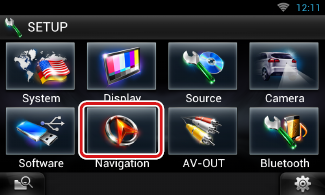
Navigation SETUP screen appears.
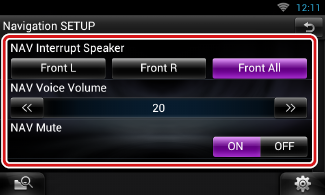
|
NAV Interrupt Speaker |
|
Select speaker(s) used for voice guidance of the navigation system. Front L: Uses the front left side speaker for voice guidance. Front R: Uses the front right side speaker for voice guidance. Front All (Default): Uses both front speakers for voice guidance. |
|
NAV Voice Volume |
|
Adjust the volume for voice guidance of the navigation system. Default is “20”. |
|
NAV Mute |
|
Mutes the volume of rear speakers during voice guidance of the navigation system. Default is “ON”. |


© 2014 JVC KENWOOD Corporation