
INSTRUCTION MANUAL
DNN991HD/ DNN9710BT
CONNECTED NAVIGATION SYSTEM
INSTRUCTION MANUAL
CONNECTED NAVIGATION SYSTEM
Displays the weather forecast for the selected region.
|
Preparation
|
 ].
]. Weather].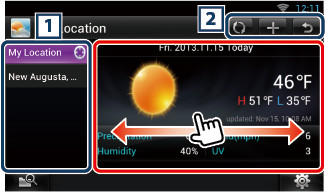
|
1 City list |
|
Displays a region list. Touching this displays the selected region. |
|
2 |
|
|
|
(Weather information) |
|
Displays the today’s weather forecast and the weather forecast for the next 6 days. |
|
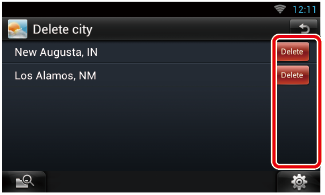
Delete |
|
Deletes a region from the City list. See Delete City. |
|
Setting |
|
Allows you to set the information update interval, etc. See Weather setup. |
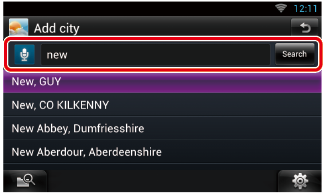
Adds a region to the City list.
 ].
].
|
|
|
You can enter a region using the voice recognition function. When "Speak now" is displayed, pronounce the region name. |
|
[Search] |
|
Search starts. |
Touching the region adds it to the list, and displays the weather forecast.
You can delete a region from the City list.
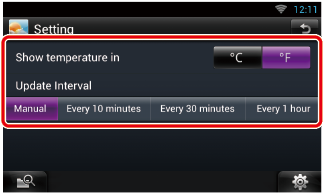
Performs setup when using Weather Application.
|
Show temperature |
|
Select a temperature scale. |
|
Update interval |
|
Set an information update interval. |


© 2014 JVC KENWOOD Corporation


