
INSTRUCTION MANUAL
DNN9250DAB/ DNN6250DAB/ DNR8025BT
CONNECTED NAVIGATION SYSTEM / CONNECTED MONITOR WITH DVD RECEIVER
INSTRUCTION MANUAL
CONNECTED NAVIGATION SYSTEM / CONNECTED MONITOR WITH DVD RECEIVER
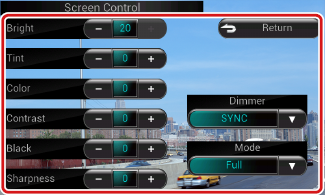
You can adjust image quality of playback screen, background screen, etc.


Screen Control screen appears.
Background screen

|
Bright / Tint / Color / Contrast / Black / Sharpness |
|
Adjusts each item. |
|
Dimmer |
|
Select dimmer mode. ON: The display and buttons dim. OFF: The display and buttons do not dim. SYNC (Default): Turns the dimmer function on or off when the vehicle light control switch is turned on or off. NAV-SYNC: Turns the dimmer function on or off according to the Navigation Day/Night display setting. (DNN9250DAB/ DNN6250DAB) |
|
Mode (Playback screen only) |
|
Select screen mode. Full: Full picture mode
Just: Justify picture mode
Zoom: Zoom picture mode
Normal: Normal picture mode
|
|
NOTE
|


© 2014 JVC KENWOOD Corporation


