
INSTRUCTION MANUAL
DNN9250DAB/ DNN6250DAB/ DNR8025BT
CONNECTED NAVIGATION SYSTEM / CONNECTED MONITOR WITH DVD RECEIVER
INSTRUCTION MANUAL
CONNECTED NAVIGATION SYSTEM / CONNECTED MONITOR WITH DVD RECEIVER
Displays the weather forecast for the selected region.
|
Preparation
|
|
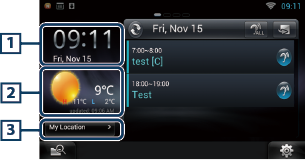
1 Time & Date |
|
Displays the current time and date. |
|
2 Weather information |
|
Displays the weather forecast for the selected region. Touching this starts the weather application. |
|
3 City information |
|
Displays the selected region. Touching this displays a region selection screen. See City select. |
|
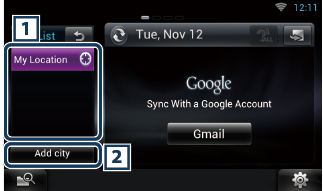
1 City list |
|
Displays a region list. Touching this displays the selected region. |
|
2 [Add City] |
|
Starts the weather application to add the region. See Add a City. |


© 2014 JVC KENWOOD Corporation