
INSTRUCTION MANUAL
DNN9250DAB/ DNN6250DAB/ DNR8025BT
CONNECTED NAVIGATION SYSTEM / CONNECTED MONITOR WITH DVD RECEIVER
INSTRUCTION MANUAL
CONNECTED NAVIGATION SYSTEM / CONNECTED MONITOR WITH DVD RECEIVER

|
NOTE
|
|
Number |
Name |
Motion |
|
|
s (Reset) |
|
|
|
S, R (Vol) |
Adjusts volume. |
|
|
Remote Sensor |
Receives the remote control signal. |
|
|
NAV (DNN9250DAB) |
|
|
APPS (DNR8025BT) |
|
|
|
|
MENU |
|
|
|
HOME |
|
|
|
6 (Back) |
|
|
|
G (Eject) |
|
|
|
Disc insert slot |
A slot to insert a disc media. |
|
|
SD card slot (DNN9250DAB) |
A slot to insert an SD card. |
* The function of the [NAV]/ [APPS] button can be changed to camera view function. See User interface.
 <G> button for 1 second.
The panel fully opens.
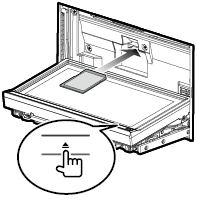
Push the card until it clicks and then remove your finger from the card.
The card pops up so that you can pull it out with your fingers.
|
NOTE
|
|
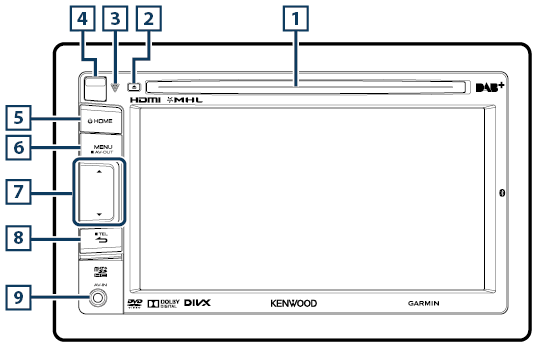
Number |
Name |
Motion |
|
|
Disc insert slot |
A slot to insert a disc media. |
|
|
G (Eject) |
|
|
|
s (Reset) |
|
|
|
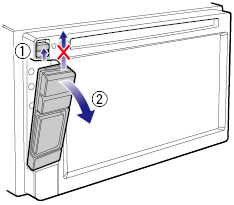
Release key |
Detaches the part of front panel. |
|
|
HOME |
|
|
|
MENU |
|
|
|
S, R (Vol) |
Adjusts volume. |
|
|
6 (Back) |
|
|
|
Input jack |
An input jack for external device. (CA-C3AV; Optional Accessory) |
|
|
microSD card slot |
A slot to insert an microSD card. |
 Release key upward to detach the part of the front panel.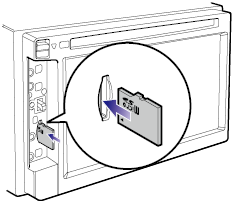
Push the card until it clicks and then remove your finger from the card.
The card pops up so that you can pull it out with your fingers.
|
NOTE
|


© 2014 JVC KENWOOD Corporation


