
INSTRUCTION MANUAL
DNN9350BT/ DNN9350BTM/ DNR8035BT/ DNR8035BTM
CONNECTED NAVIGATION SYSTEM / CONNECTED MONITOR WITH DVD RECEIVER
INSTRUCTION MANUAL
CONNECTED NAVIGATION SYSTEM / CONNECTED MONITOR WITH DVD RECEIVER
Most functions can be controlled from the source control screen and playback screen.
|
NOTE
|
Control screen
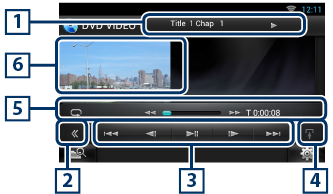
Playback screen
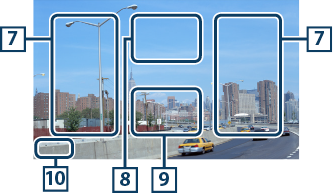
|
1 Information display |
|
Displays the following information.
Touch this area to display the disc lable name. |
|
2 Multi function key |
|
Touch to switch the multi function menu. For details on the menu, see Multi function menu. |
|
3 Multi function menu |
|
Various functions can be operated using keys in this menu. For details on the keys, see Multi function menu. |
|
4 Control switching key |
|
Unavailable in DVD/VCD source. |
|
5 Sub function menu |
|
The following functions can be performed by using keys in this area.
|
|
6 Movie display area |
|
Touch to display Video screen. |
|
7 Searching area |
|
Touch to search the next/previous content. Scrolling from center of display to left or right performs fast backward or fast forward. Each time you touch each area, the speed changes; standard, 2 times, 3 times. To stop fast backward/forward, touch center of the display. |
|
8 Menu display area |
|
This area functions differently depending on the current status.
|
|
9 Key display area |
|
Touch to display the last control screen. |
|
10 Screen setup display area |
|
Touch and hold to display the screen control screen. See Monitor Screen Setup. |
|
NOTE
|
DVD

VCD

The functions of each key are as follows.
|
[E] [F] |
|
Searches the previous/next content. |
|
[DH] |
|
Plays or pauses. |
|
[¼] or [½] (DVD only) |
|
Plays in slow motion forward or backward. |
|
[I] |
|
Stops playback. When touched twice, the disc is played from the beginning when you play it the next time. |
|
[PBC] (VCD only) |
|
Turn PBC on or off. |


© 2014 JVC KENWOOD Corporation
 ]. Each time you touch the key, repeat mode switches in the following sequence;
  , "chapter repeat"
  , "function off"