Connecting the system and external components
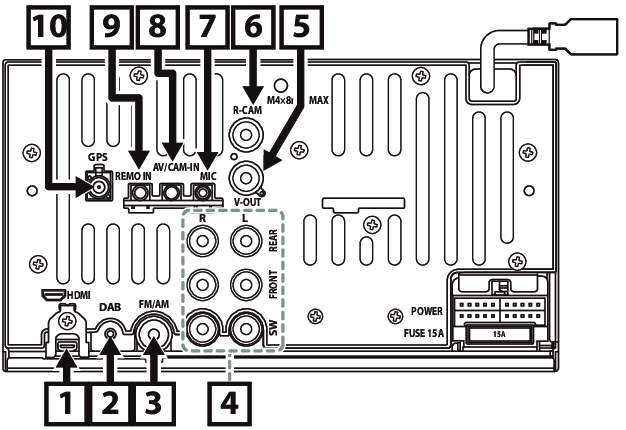
① | HDMI input (Type-D) Connect a KCA-HD200 (optional accessory) to HDMI input terminal. |
② | Digital Radio antenna CX-DAB1 (optional accessory) ! CAUTION Use of a CX-DAB1 (optional accessory) as a Digital Radio antenna is recommended. When using a commercially available Digital Radio antenna, the diameter of the SMB connector must be Φ6.5 mm or less. |
③ | FM/AM antenna input
|
④ | When connecting to an external amplifier, connect its ground wire to the car’s chassis to avoid damaging the unit. |
⑤ | Visual Output (Yellow)
|
⑥ | Rear view camera input (Yellow) |
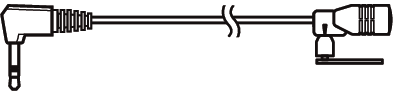
⑦ | Accessory ② : Microphone
|
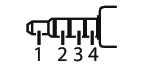
⑧ | This jack accepts either AV-IN or front view camera input. For more information, see Input Setup. 3.5 mm 4 pole mini plug (1; Left audio, 2; Video, 3; Ground, 4; Right audio)
|
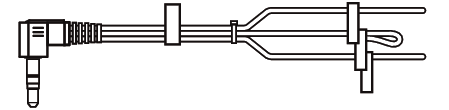
⑨ | Accessory ⑥ : Steering remote harness Connect to vehicle’s steering remote harness. Contact your KENWOOD dealer for details.
|
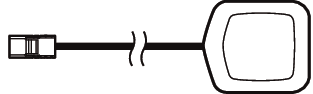
⑩ | Accessory ⑤ : GPS Antenna Use the supplied GPS antenna. Using the GPS antenna other than the supplied one may cause a drop in positioning accuracy.
|

Installation/removal of fixing bracket
When you connect the cable to HDMI terminal, remove the fixture. After connecting the cable, put the fixture again.