Basic Operation
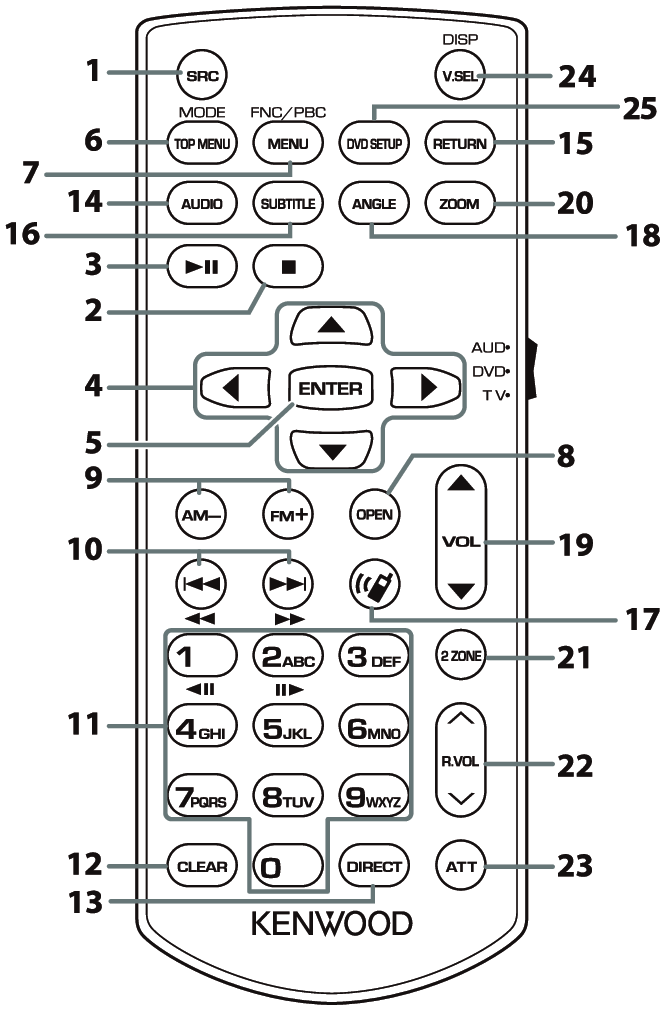
| Key Name | Mode switch | Function |
|---|---|---|---|
1 | SRC | − | Switches to the source to be played. In Hands-Free mode, hangs up the phone. |
2 | I | − | Not used. |
3 | L | − | Pauses the track or file, and resumes playing by pressing twice. For the Radio sources in AUD mode, switches the seek mode. |
4 | R/S/C/D | − | Not used. |
5 | ENTER | − | Not used. |
6 | TOP MENU | − | Not used. |
7 | MENU | − | Not used. |
8 | OPEN | − | Not used. |
9 | AM–/FM+ | AUD | Selects the folder to be played. For the Radio sources in AUD mode, selects FM/AM band to be received. |
10 | E/F | − | Selects the track or file to be played. For the Radio sources in AUD mode, switches to broadcast stations received by the unit. |
11 | Numeric Keypad | AUD | Allows you to enter the number to search in the direct search mode. For details on the direct search mode, see Direct search mode. |
12 | CLEAR | − | Not used. |
13 | DIRECT | − | Switches to the direct search mode. Direct search mode. |
14 | AUDIO | − | Not used. |
15 | RETURN | − | Not used. |
16 | SUBTITLE | − | Not used. |
17 |
| − | When a call comes in, answers the call. |
18 | ANGLE | − | Not used. |
19 | VOL RS | − | Adjusts the volume. |
20 | ZOOM | − | Not used. |
21 | 2 ZONE | − | Not used. |
22 | R.VOL 32 | − | Not used. |
23 | ATT | − | Lowers the volume by pressing the key once. Restores the previous volume by pressing the key twice. |
24 | V.SEL/DISP | − | Switches between the Apple CarPlay, Android Auto, Wireless mirroring and AV source screen each time it is pressed. |
25 | DVD SETUP | − | Not used. |
