Installing the main unit
- Make sure that the unit is installed securely in place. If the unit is unstable, it may malfunction.
- Remove parts that interfere with installing such as a panel on the vehicle.
- Install the vehicle mounting bracket to the main unit.
- Connect the wiring harness wires and peripheral equipment.
- Install the main unit to the vehicle.
- Reinstall the removed parts such as a panel on the vehicle.
- Connect the display cable.
- Install the display unit (accessory ⑥) to the main unit.
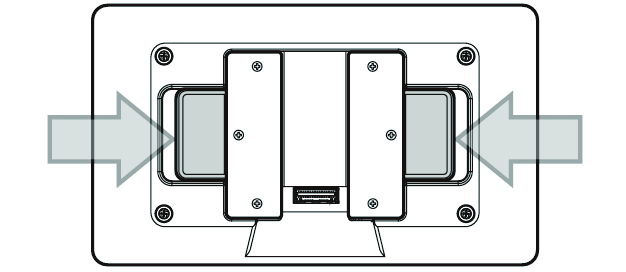
- To install, while pulling both sliders on the back of the display unit to the side, align the bracket on the main unit with the slot on the display unit.
- Be careful that the display cable does not become pinched between the slot and bracket when installing the display unit. Forcefully inserting the unit with the cable trapped could damage the unit.
- Adjust the height and angle of the display unit.
- Vertical tilt: ±21°, horizontal tilt: ±12°
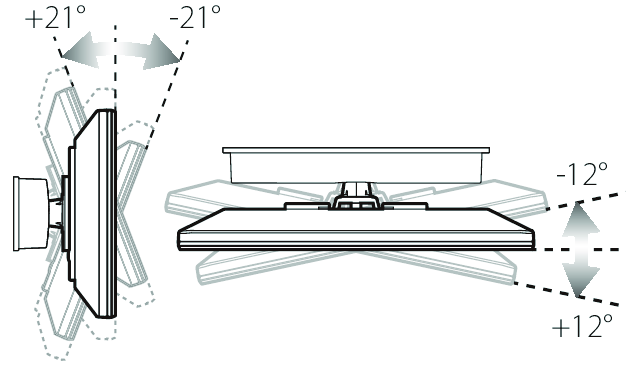
- Height adjustment: ±15 mm from center (45 mm)
CAUTION
- Ensure that the bottom edge of the display unit is at least 30 mm away from the main unit panel for use.
- Do not use if the distance between the two is less than 30 mm (a position where the bracket is visible from the slot), as the display unit could fall.
- Check whether the sliders on the back of the display unit have returned to their original position. The sliders will not return to their original positions if the gears are misaligned.