Input Setup
- Press the
 /
/  button.
 - Touch
 .
. - SETUP Menu screen appears.
- Touch
 .
. - Input setup menu appears.
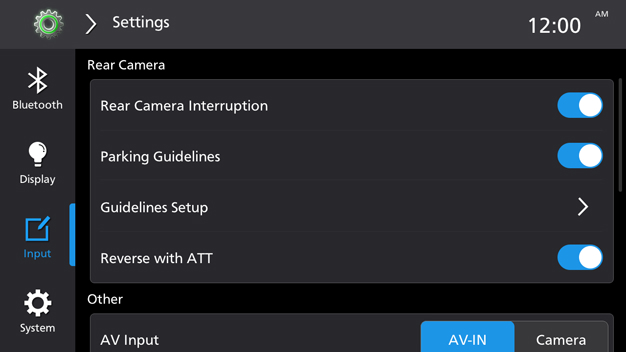
Rear Camera
[Rear Camera Interruption]
- ON: Display camera screen automatically when reversing.
- OFF: Camera screen will not display automatically when reversing.
[Parking Guidelines]
Show/Hide the Parking guidelines.
[Guidelines Setup]
Touch to enter the reverse guidance line setting screen. When Parking Guidelines is OFF, the Guidelines Setup is invalid.
[Reverse with ATT]
Turn ON/OFF the attenuator of reverse.
- ON: Decrease the audio volume automatically when the gear is shifted to the reverse (R) position.
Other
[AV Input]
- [AV-IN]: Select this when an external AV devices connected.
- [Camera]: Select this to watch the view from the connected camera.
[AV-IN Camera Mirror]
Set the image of AV-IN Camera is mirrored or not. When "AV Input" is set to "AV-IN", this option is invalid.
[SWC Learning]
Touch to enter the SWC Learning setup screen.
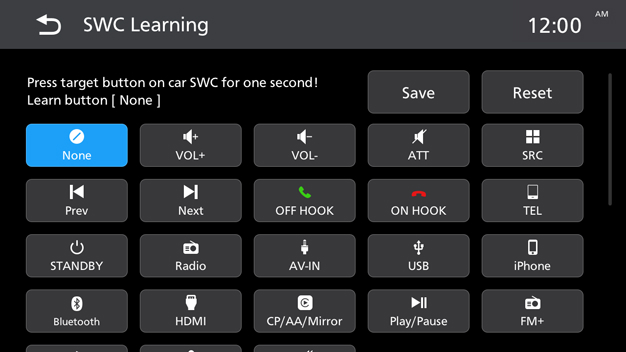
Touch a function button on the screen, then press target button on car SWC for more than 1 second.
Touch [Save] to save the settings.
Touch [Reset] to reset the settings.
[Android Phone Connection Mode]
Select whether to use Android Auto or mirroring for a wired connection. *1
- The device cannot switch between Mirroring and Android Auto when either is connected.