Installing the Separate model
Preparation
- You may need the ADS installation kit to align with the installation vehicle.
- Link: https://www.idatalinkmaestro.com
- See the instruction manual included with the installation kit for how to install.
NOTE
- Be sure to install using the ADS installation kit. The unit may not operate properly if the installation kit is not used.
Installation overview
- Depending on how the main unit is oriented, [Installation Orientation] may require configuring. System Configuration settings
- Connect the main unit display cable (65 cm / 2.1 ft.) to the display unit (accessory ⑧). If the display cable does not reach, you will need the extension cable KCA-A150EX (150 cm / 4.9 ft, sold separately).
Installing the remote control sensor
- Confirm the installation location for the remote control sensor (accessory ⑯).
- Clean the surface of the installation location.
- Remove the separator on the remote control sensor (accessory ⑯) and attach the light receptor.
- Use tape to secure the remote control sensor cable at several locations and run it to the display unit (accessory ⑧).
NOTE
- Take note of the following precautions when installing the remote control sensor (accessory ⑯).
- Install in a location that can easily receive the infrared signals from the remote control.
- Select a location where double-sided tape can be used to secure the sensor.
Main unit allowable installation angles
- Installed horizontally
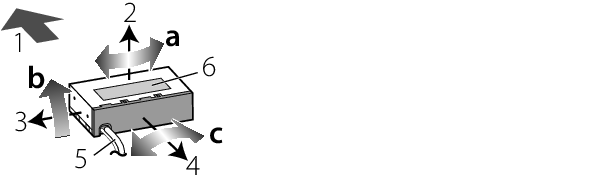
- Installed vertically
| Installed horizontally | Installed vertically | |
|---|---|---|---|
a | Yaw | ±5° | ±5° |
b | Pitch | 0° – 40° | ±20° |
c | Roll | ±5° | ±5° |
1 |
| Front side of the vehicle | |
2 |
| Top side | |
3 |
| Left side | |
4 |
| Cluster panel side (inside the vehicle interior) | |
5 | Display cable | ||
6 | Model name plate | ||


